


.webp "Watch videos offline, listen to music offline with Cốc Cốc Playlist")
Awesome as a multimedia app
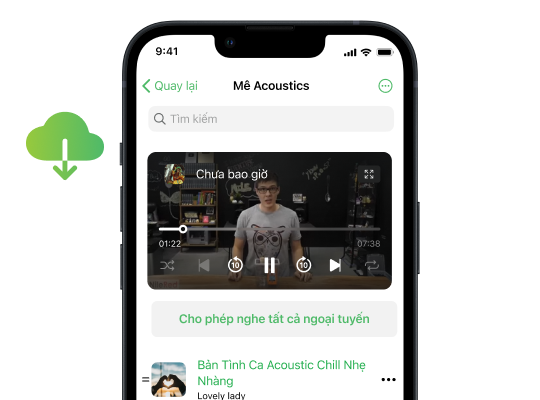
Listen to music offline as you like
With Cốc Cốc Playlist feature, music can always be by your side! You can enable offline listening for a specific song or an entire playlist to enjoy anytime, anywhere and even without internet connection.
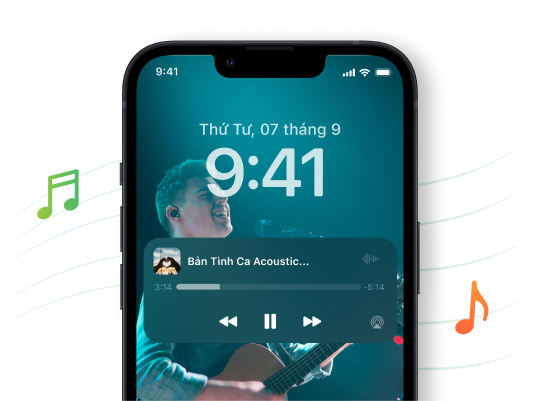
Don't want music to stop when turning off the screen?
Here goes Play music in background feature! You can listen to music when the screen is off, while you're surfing the web on Cốc Cốc or continue listening when chatting, playing games on another app.
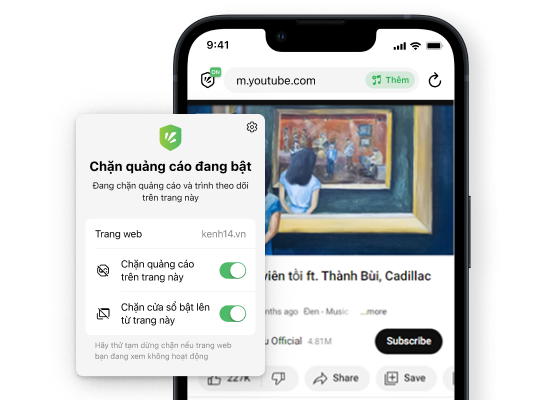
Watch videos and listen to music ad-free
Not only can you watch videos and listen to music offline, but Cốc Cốc also automatically blocks ads, giving you a smooth, uninterrupted experience every time.
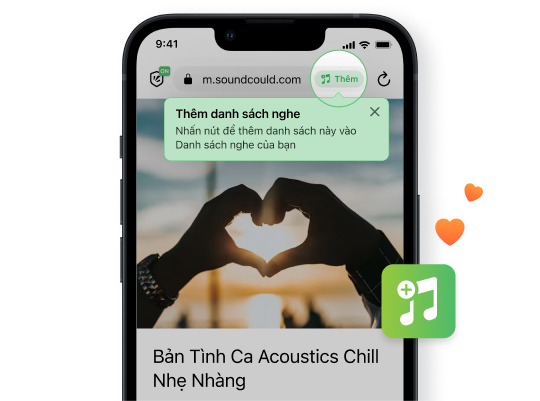
Easy to add songs or curated playlists
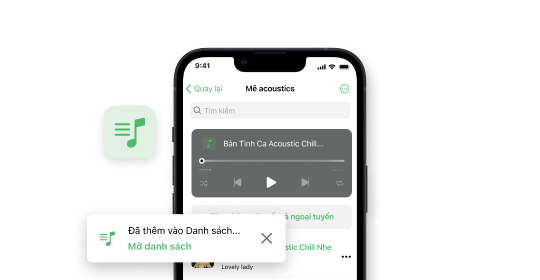
Just one tap to add an individual song or an entire playlist on supported platforms to Cốc Cốc Playlist. Bring the whole music world to your phone in a blink, without any song limits.
Download Cốc Cốc for iOS
Enjoy the Cốc Cốc Playlist
What users say about Cốc Cốc for iOS
Trần Anh Toàn
App Store
Really awesome, good adblocker, YouTube background play, cool playlist feature.

Cừu Mắt Hí
App Store
Block ads, play in background on YouTube. Add music playlist without logging in. Set timer and everything...
Hành
App Store
The music listening feature on Cốc Cốc is so awesome.
Frequently asked questions
Which platforms can I add videos and music from to my Cốc Cốc Playlist?
The Cốc Cốc Playlist feature (on iOS) allows you to add videos and music from the following sites:
- YouTube
- SoundCloud
- Zing MP3
- NhacCuaTui
When you visit these platforms using the Cốc Cốc browser on an iOS mobile device, simply tap the Add icon in the address bar to add content to your Cốc Cốc Playlist.
- YouTube
- SoundCloud
- Zing MP3
- NhacCuaTui
When you visit these platforms using the Cốc Cốc browser on an iOS mobile device, simply tap the Add icon in the address bar to add content to your Cốc Cốc Playlist.
How to add video or music to Cốc Cốc Playlist?
To add a video or music to Cốc Cốc Playlist, please follow these steps:
1. Open Cốc Cốc on your iPhone.
2. Go to your favorite song or video on YouTube, SoundCloud, ZingMP3 or NhacCuaTui.
3. Tap Add button on the address bar.
4. Select to add music or video to your created playlist or create a new playlist.
For more ways to add videos or music to your Cốc Cốc Playlist, read more in the article Introducing Playlist feature on Cốc Cốc for iOS.
1. Open Cốc Cốc on your iPhone.
2. Go to your favorite song or video on YouTube, SoundCloud, ZingMP3 or NhacCuaTui.
3. Tap Add button on the address bar.
4. Select to add music or video to your created playlist or create a new playlist.
For more ways to add videos or music to your Cốc Cốc Playlist, read more in the article Introducing Playlist feature on Cốc Cốc for iOS.
How to open your created playlist?
To open your created playlist, please follow these steps:
1. At the bottom right corner, tap the Browser menu icon (≡ icon).
2. Tap Cốc Cốc Playlist.
3. Select your created playlist.
Note: Currently, Cốc Cốc Playlist feature is only available on Cốc Cốc app for iOS.
Read more in the article Introducing Cốc Cốc Playlist feature on Cốc Cốc for iOS.
1. At the bottom right corner, tap the Browser menu icon (≡ icon).
2. Tap Cốc Cốc Playlist.
3. Select your created playlist.
Note: Currently, Cốc Cốc Playlist feature is only available on Cốc Cốc app for iOS.
Read more in the article Introducing Cốc Cốc Playlist feature on Cốc Cốc for iOS.
Can I use the Cốc Cốc Playlist feature on Android phones?
No. Currently, the Cốc Cốc Playlist feature is only supported on iOS phones (iPhone). Devices such as iOS tablets (iPad), Android phones, and computers do not support the Playlist feature.
How to add a curated playlist to Cốc Cốc Playlist?
To add an entire playlist to Cốc Cốc Playlist, you can follow either of the following instructions:
Instruction 1: Add directly
1. Open Cốc Cốc on your iPhone.
2. Go to your favorite playlist on YouTube, SoundCloud, ZingMP3 or NhacCuaTui.
3. Tap Add button on the address bar.
4. Select to add to your created playlist or create a new playlist.
Instruction 2: Add by link
1. Open Cốc Cốc on your iPhone.
2. At the bottom right corner, tap the Browser menu icon (≡ icon).
3. Tap Cốc Cốc Playlist.
4. At the top right corner, tap More icon (⋯ icon) > select Import playlists from other sources.
5. Paste the playlist URL > tap Import.
Note: Currently, Cốc Cốc Playlist feature is only available on Cốc Cốc app for iOS.
Instruction 1: Add directly
1. Open Cốc Cốc on your iPhone.
2. Go to your favorite playlist on YouTube, SoundCloud, ZingMP3 or NhacCuaTui.
3. Tap Add button on the address bar.
4. Select to add to your created playlist or create a new playlist.
Instruction 2: Add by link
1. Open Cốc Cốc on your iPhone.
2. At the bottom right corner, tap the Browser menu icon (≡ icon).
3. Tap Cốc Cốc Playlist.
4. At the top right corner, tap More icon (⋯ icon) > select Import playlists from other sources.
5. Paste the playlist URL > tap Import.
Note: Currently, Cốc Cốc Playlist feature is only available on Cốc Cốc app for iOS.
How to listen to music with the screen off?
Cốc Cốc has Play music in background and Adblock feature, allowing you to freely listen to ad-free music with the screen off and continue listening when switching tab or switching to another app. Features are also supported on YouTube.
With music platform (e.g. NhacCuaTui): Simply go to the website on Cốc Cốc, play music and turn off the screen.
With video sharing platform (e.g. YouTube):
1. Open Cốc Cốc and access a YouTube video.
2. Tap the Pin video icon on the media panel (appearing below the video player).
3. Turn off the screen and continue listening to music.
With YouTube, SoundCloud, NhacCuaTui, ZingMP3 platforms (applied on iOS only):
1. Open Cốc Cốc and go to the link of your favorite content.
2. Add to Cốc Cốc Playlist.
3. Open your created playlist and play the audio you want to listen to.
4. Based on your preferences, select Shuffle, Repeat or Repeat one/Loop mode.
5. Turn off the screen and continue listening to music.
Read more in the article How to listen to music with the screen off on iOS and How to listen to music with the screen off on Android.
With music platform (e.g. NhacCuaTui): Simply go to the website on Cốc Cốc, play music and turn off the screen.
With video sharing platform (e.g. YouTube):
1. Open Cốc Cốc and access a YouTube video.
2. Tap the Pin video icon on the media panel (appearing below the video player).
3. Turn off the screen and continue listening to music.
With YouTube, SoundCloud, NhacCuaTui, ZingMP3 platforms (applied on iOS only):
1. Open Cốc Cốc and go to the link of your favorite content.
2. Add to Cốc Cốc Playlist.
3. Open your created playlist and play the audio you want to listen to.
4. Based on your preferences, select Shuffle, Repeat or Repeat one/Loop mode.
5. Turn off the screen and continue listening to music.
Read more in the article How to listen to music with the screen off on iOS and How to listen to music with the screen off on Android.
How to watch a video or listen to music offline?
You can use Cốc Cốc as an offline music listening and video watching app on your mobile. To enjoy offline listening and watching with Cốc Cốc, you can follow one of the following instruction:
Instruction 1: Use Fast download feature on Cốc Cốc (applied on Android and iOS)
1. Open Cốc Cốc and go to the link of the song or video you want to listen offline.
2. Tap the Download button (↓ icon) on the address bar.
3. At the bottom right corner, tap Browser menu icon (≡ icon) > tap Downloads.
4. Select any audio to listen offline right on Cốc Cốc app.
Note: With YouTube, Cốc Cốc app for iOS currently does not support video download.
Instruction 2: Use Cốc Cốc Playlist feature on Cốc Cốc (applied on iOS)
1. Open Cốc Cốc and go to the link of your favorite content on YouTube, SoundCloud, NhacCuaTui or ZingMP3.
2. Add songs or videos to Cốc Cốc Playlist.
3. Open your created playlist.
- Listen to an entire playlist offline: Tap the Make all offline button right on the screen.
- Listen to a specific song offline: On the right of the song or video, tap More icon (⋯ icon) > select Make offline.
Read more in the article How to watch a video and listen to music offline on iPhone.
Instruction 1: Use Fast download feature on Cốc Cốc (applied on Android and iOS)
1. Open Cốc Cốc and go to the link of the song or video you want to listen offline.
2. Tap the Download button (↓ icon) on the address bar.
3. At the bottom right corner, tap Browser menu icon (≡ icon) > tap Downloads.
4. Select any audio to listen offline right on Cốc Cốc app.
Note: With YouTube, Cốc Cốc app for iOS currently does not support video download.
Instruction 2: Use Cốc Cốc Playlist feature on Cốc Cốc (applied on iOS)
1. Open Cốc Cốc and go to the link of your favorite content on YouTube, SoundCloud, NhacCuaTui or ZingMP3.
2. Add songs or videos to Cốc Cốc Playlist.
3. Open your created playlist.
- Listen to an entire playlist offline: Tap the Make all offline button right on the screen.
- Listen to a specific song offline: On the right of the song or video, tap More icon (⋯ icon) > select Make offline.
Read more in the article How to watch a video and listen to music offline on iPhone.
How to set sleep timer?
To set sleep timer in Playlist on Cốc Cốc, please follow these steps:
1. At the bottom right corner, tap the Browser menu icon (≡ icon) > tap Cốc Cốc Playlist.
2. Open your created playlist and play the audio you want to listen to.
3. At the top right corner, tap the More icon (⋯ icon) > select Sleep timer.
4. Select countdown time > tap Start.
Note: Currently, Cốc Cốc Playlist feature is only available on Cốc Cốc app for iOS.
1. At the bottom right corner, tap the Browser menu icon (≡ icon) > tap Cốc Cốc Playlist.
2. Open your created playlist and play the audio you want to listen to.
3. At the top right corner, tap the More icon (⋯ icon) > select Sleep timer.
4. Select countdown time > tap Start.
Note: Currently, Cốc Cốc Playlist feature is only available on Cốc Cốc app for iOS.
How to edit your created playlist?
Firstly, please access Cốc Cốc Playlist following these steps:
1. Open Cốc Cốc on iPhone.
2. At the bottom right corner, tap the Browser menu icon (≡ icon).
3. Tap Playlist.
4. Select your created playlist.
To edit the entire playlist: At the top right corner, tap the More icon (⋯ icon).
- Edit name
- Import playlists from other sources
- Sleep timer
- Make all offline
- Sort: By name or by recent
- Delete playlist
To edit a specific audio file in the playlist: On the right of the file, tap the More icon (⋯ icon).
- Make offline
- Delete audio
1. Open Cốc Cốc on iPhone.
2. At the bottom right corner, tap the Browser menu icon (≡ icon).
3. Tap Playlist.
4. Select your created playlist.
To edit the entire playlist: At the top right corner, tap the More icon (⋯ icon).
- Edit name
- Import playlists from other sources
- Sleep timer
- Make all offline
- Sort: By name or by recent
- Delete playlist
To edit a specific audio file in the playlist: On the right of the file, tap the More icon (⋯ icon).
- Make offline
- Delete audio

Can't find what you're looking for?
Please visit our Support center to find instructions or chat with our staff.
Please visit our Support center to find instructions or chat with our staff.