


Multitasking experiences with YouTube PiP
It’s much easier to watch YouTube videos and multitasking with Pin video feature.

Enjoy YouTube video without interruption

Watch YouTube video and continue working
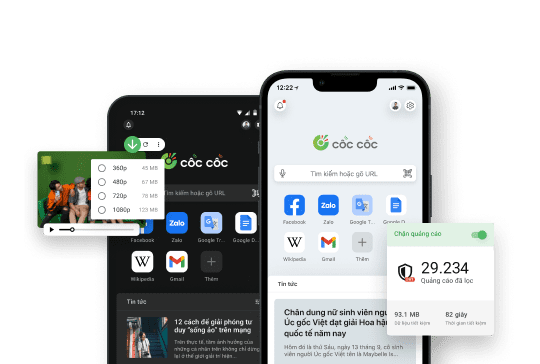
Enjoy watching YouTube video and browsing the web simultaneously with the Pin video feature. YouTube videos will continue playing in a floating window even when switching tabs or using other applications, providing you with a convenient multitasking experience.

Block ads on every YouTube video
No more worries about being bothered by ads while watching YouTube videos. Adblock Plus technology integrated into Cốc Cốc is continuously updated according to the anti-adblocker policy, allowing you to enjoy YouTube videos without ads.

Play YouTube in the background made-easy
Experience listening to YouTube with the screen off for free with Play audio in background feature. No need to install an additional app, Cốc Cốc browser allows you to listen to music with the screen off on most websites, including YouTube.
Download Cốc Cốc browser
to experience watching YouTube PiP
What users say about Cốc Cốc
gianganhtuan
Play Store
Listening to YouTube music and not afraid of draining the battery. I heard with the pin video feature

người dùng trên google play
Play Store
A convenient app, I like the feature that can pin the video to the main screen when watching movies and videos. The app is quite smooth
ajgansg
Play Store
Thanks to this application I can play games and pin videos at the same time, thank the developers very much
Frequently asked questions
How to pin a YouTube video
You can use the Pin video feature on both Cốc Cốc desktop and mobile browser. To pin a YouTube video, follow the steps below:
With desktop browser
1. Open Cốc Cốc and go to your favorite YouTube video.
2. Hover over the video player.
3. Click Pin video icon on the media panel.
With mobile browser
1. Open Cốc Cốc and go to your favorite YouTube video.
2. Tap Pin video icon on the media panel.
Note: On the mobile browser, to automatically pin videos on video-sharing platforms, go to the Menu (hamburger menu) > Settings > Pin & Play video in the background > Turn on Video auto-pinning.
With desktop browser
1. Open Cốc Cốc and go to your favorite YouTube video.
2. Hover over the video player.
3. Click Pin video icon on the media panel.
With mobile browser
1. Open Cốc Cốc and go to your favorite YouTube video.
2. Tap Pin video icon on the media panel.
Note: On the mobile browser, to automatically pin videos on video-sharing platforms, go to the Menu (hamburger menu) > Settings > Pin & Play video in the background > Turn on Video auto-pinning.
YouTube also allows playing video in miniplayer, why should I use the Pin video feature on Cốc Cốc?
The app and website version of YouTube allows users to continue watching videos in miniplayer, but the Pin video feature on Cốc Cốc has outstanding advantages:
- Continue watching videos when switching tabs, using another app: YouTube's miniplayer only allows videos to be viewed in floating windows if you continue to browse on YouTube. With Cốc Cốc, you can freely watch YouTube video and continue messaging, playing games, surfing the web, or using other applications on your phone.
- Customize floating window size: You can drag and drop to change the size of the floating window, or move the floating window to the desired position on Cốc Cốc. YouTube miniplayer will not be able to perform this feature.
- Play audio in the background: Cốc Cốc browser allows you to listen to YouTube with the screen off with the Play audio in background feature, helping you enjoy music without interruption even when turning off the screen. On YouTube, this feature is only available on YouTube Premium.
- Continue watching videos when switching tabs, using another app: YouTube's miniplayer only allows videos to be viewed in floating windows if you continue to browse on YouTube. With Cốc Cốc, you can freely watch YouTube video and continue messaging, playing games, surfing the web, or using other applications on your phone.
- Customize floating window size: You can drag and drop to change the size of the floating window, or move the floating window to the desired position on Cốc Cốc. YouTube miniplayer will not be able to perform this feature.
- Play audio in the background: Cốc Cốc browser allows you to listen to YouTube with the screen off with the Play audio in background feature, helping you enjoy music without interruption even when turning off the screen. On YouTube, this feature is only available on YouTube Premium.
How to change the size of the floating window?
You can change the size of the floating window according to your needs by following these steps:
With desktop browser:
- Customize the size: Place the mouse in any corner or edge of the floating window and drag it to zoom in/out the video.
- Move the video: Place your mouse inside the floating window and move the video where you want it on the screen.
With mobile browser:
- Customize the size: Place two fingertips in the floating window and drag to zoom in/out the video.
- Move the video: Place your fingertip in a floating window and move the video where you want it on the screen.
With desktop browser:
- Customize the size: Place the mouse in any corner or edge of the floating window and drag it to zoom in/out the video.
- Move the video: Place your mouse inside the floating window and move the video where you want it on the screen.
With mobile browser:
- Customize the size: Place two fingertips in the floating window and drag to zoom in/out the video.
- Move the video: Place your fingertip in a floating window and move the video where you want it on the screen.
How to listen to YouTube with the screen off
On mobile browser, you can use the Pin video feature to listen to YouTube in the background. For YouTube and other video platforms, follow these steps to listen to music in the background:
1. Open Cốc Cốc and go to your favorite video.
2. Tap Pin video icon on the media panel.
3. Turn off the screen and the music will continue to play.
See more about articles How to listen to YouTube with the screen off on iOS and How to listen to YouTube with the screen off on Android.
1. Open Cốc Cốc and go to your favorite video.
2. Tap Pin video icon on the media panel.
3. Turn off the screen and the music will continue to play.
See more about articles How to listen to YouTube with the screen off on iOS and How to listen to YouTube with the screen off on Android.
Will I see ads if I watch videos in floating windows?
Cốc Cốc browser is integrated with Adblock Plus technology, helping you block YouTube ads and many other websites. Therefore, you can watch YouTube videos in normal size or floating windows without being bothered by ads.
Learn more about Adblock YouTube feature.
Learn more about Adblock YouTube feature.
Can I close the video playing tab when watching a video in a floating window?
On Cốc Cốc mobile browser, you can close the video playing tab and continue watching videos in floating windows with Pin video feature.
With desktop browsers, Cốc Cốc currently does not support playing videos in floating windows when closing the video playing tab.
With desktop browsers, Cốc Cốc currently does not support playing videos in floating windows when closing the video playing tab.

Can't find what you're looking for?
Please visit our Support center to find instructions or chat with our staff.
Please visit our Support center to find instructions or chat with our staff.