


Watch YouTube without interruption on Cốc Cốc
Download the newest browser version to enjoy video without interrupting ads!

Awesome features. Use for free

Integrate the most updated technology from Adblock Plus
Cốc Cốc works with Adblock Plus to constantly update the feature, allowing to bypass anti-adblocker policy.

Allow ads "in a blink"
In some cases, ads may appear in a blink and be skipped automatically without you realizing it at all!

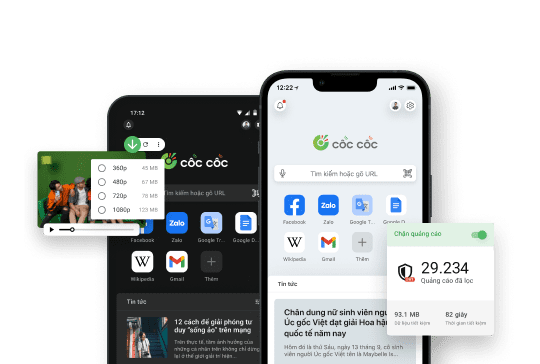
Pin video
Watch in floating window when surfing the web or use another app

No more annoyance
Goodbye annoying ads when watching on PC, mobile or TV

Background play
Continue listening when using another app or with the screen off
Built-in feature that's easy to use

Update to the latest version
Open Browser menu > select Help > select About Cốc Cốc.

Visit youtube.com on the browser
Search and watch any video that you like.

Enjoy ad-free experience
Adblocker is enabled by default.
Download Cốc Cốc browser
to enjoy unlimited YouTube experience
What users say about Cốc Cốc
Minh Khả
Play Store
Great! I never get bothered by ads anymore when surfing the web.

Đào Thắng
Play Store
Great, there is no interruption from ads and web loading never lags.
Hoang Rito
Facebook Group
I like Cốc Cốc because of the ad block function. When reading news or watching movies, I'm never bothered by ads.
Frequently asked questions
How to check and update Cốc Cốc to the newest version?
To check and update Cốc Cốc desktop browser to the newest version, you can follow these steps:
1. Open Cốc Cốc on the computer.
2. On the upper right, click Browser menu icon (hamburger menu icon).
3. Click Help > About Cốc Cốc.
4. Wait for the update to complete.
If you see "Cốc Cốc is up to date", it means that you are using the newest version.
5. Click Relaunch to apply changes.
1. Open Cốc Cốc on the computer.
2. On the upper right, click Browser menu icon (hamburger menu icon).
3. Click Help > About Cốc Cốc.
4. Wait for the update to complete.
If you see "Cốc Cốc is up to date", it means that you are using the newest version.
5. Click Relaunch to apply changes.
How to turn off anti-adblocker wall?
If you are using an ablock browser or extension, you may encounter these following notifications when watch YouTube on the computer:
- Ad blockers are not allowed on YouTube: You can select Allow YouTube Ads to turn off the notification. If you still want to watch videos with no interruption, you can consider turning adblock back on.
- Video player will be blocked after 3 videos: You must select Allow YouTube Ads or Try YouTube Premium. If you select Allow YouTube Ads, you can turn adblock back on, but YouTube will stop service after 3 video.
- Ad blockers violate YouTube's Terms of Services: You are forced to select Allow YouTube Ads or Try YouTube Premium. Even if you switch to another adblock browser or extension, this notification won't go away. In the mean time, you can turn off adblock to continue using YouTube while Cốc Cốc development team is working on new solutions.
- Ad blockers are not allowed on YouTube: You can select Allow YouTube Ads to turn off the notification. If you still want to watch videos with no interruption, you can consider turning adblock back on.
- Video player will be blocked after 3 videos: You must select Allow YouTube Ads or Try YouTube Premium. If you select Allow YouTube Ads, you can turn adblock back on, but YouTube will stop service after 3 video.
- Ad blockers violate YouTube's Terms of Services: You are forced to select Allow YouTube Ads or Try YouTube Premium. Even if you switch to another adblock browser or extension, this notification won't go away. In the mean time, you can turn off adblock to continue using YouTube while Cốc Cốc development team is working on new solutions.
Can switching to another browser help me avoid anti-adblocker policy?
The anti-adblocker policy is always changing and affecting how web browsers and adblocking extensions work. Therefore, switching to another browser or extension will not help you avoid these measures.
As for Cốc Cốc, the development team has been proactively working to update new adblocking method that's more effective. You can download Cốc Cốc Beta to be the first to experience our new solution. Try it out and share your feedback in Cốc Cốc Beta Community to help us improve our product and release new solutions in the official updates as soon as possible.
As for Cốc Cốc, the development team has been proactively working to update new adblocking method that's more effective. You can download Cốc Cốc Beta to be the first to experience our new solution. Try it out and share your feedback in Cốc Cốc Beta Community to help us improve our product and release new solutions in the official updates as soon as possible.
Can the mobile browser version block ads?
As far as we know, the anti-adblocker policy currently only affects YouTube users on desktop. On the mobile platform, Cốc Cốc browser for both Android and iOS has built-in Adblock feature. Users can still watch Youtube with no interruption as usual.
Why am I still seeing ads?
The reasons why you encounter this issue may be:
- Cốc Cốc browser has not been updated to the latest version.
- Cốc Cốc's Adblock feature cannot work properly due to conflicts with other third-party adblocking extensions.
- Anti-adblocker policy has been changed or updated. As for this case, we have been proactively working to update our product feature, allowing to bypass the latest anti-adblocker methods.
Read more in article Updating new adblocking solution on Cốc Cốc.
- Cốc Cốc browser has not been updated to the latest version.
- Cốc Cốc's Adblock feature cannot work properly due to conflicts with other third-party adblocking extensions.
- Anti-adblocker policy has been changed or updated. As for this case, we have been proactively working to update our product feature, allowing to bypass the latest anti-adblocker methods.
Read more in article Updating new adblocking solution on Cốc Cốc.
Cốc Cốc's Adblock feature is not working, what should I do?
To experience the latest Adblock feature, you need to update or download Cốc Cốc browser version 123.0.168 or later.
Note: To avoid conflicts, Cốc Cốc recommends that you turn off other third-party adblocking extensions on the browser.
If you are using the latest version of Cốc Cốc and have turned off other third-party extensions but it's still not working, please try the following tips to continue watching videos without interruption:
- Refresh page (F5)
- Log out of your YouTube account
- Open Incognito mode
- Watch YouTube on the sidebar in mobile view
- Switch to YouTube Music for music listening
If all the above tips are not effective, you can turn off Cốc Cốc's Adblock feature for now. This allows you to continue watching videos on YouTube, but there will be ads.
In the meantime, we will continue to develop new solutions to resolve the issues with ads on the video player of YouTube. Therefore, please continue using and share your feedback in Cốc Cốc User Community. We'd love to hear your opinitions to quickly improve and optimize our adblocking solution.
Read more in the article Tips on how to resolve the issue when Cốc Cốc cannot block ads.
Note: To avoid conflicts, Cốc Cốc recommends that you turn off other third-party adblocking extensions on the browser.
If you are using the latest version of Cốc Cốc and have turned off other third-party extensions but it's still not working, please try the following tips to continue watching videos without interruption:
- Refresh page (F5)
- Log out of your YouTube account
- Open Incognito mode
- Watch YouTube on the sidebar in mobile view
- Switch to YouTube Music for music listening
If all the above tips are not effective, you can turn off Cốc Cốc's Adblock feature for now. This allows you to continue watching videos on YouTube, but there will be ads.
In the meantime, we will continue to develop new solutions to resolve the issues with ads on the video player of YouTube. Therefore, please continue using and share your feedback in Cốc Cốc User Community. We'd love to hear your opinitions to quickly improve and optimize our adblocking solution.
Read more in the article Tips on how to resolve the issue when Cốc Cốc cannot block ads.

Can't find what you're looking for?
Please visit our Support center to find instructions or chat with our staff.
Please visit our Support center to find instructions or chat with our staff.